AI-powered site inspection · Built for Ireland
Site inspections, drawings and project records.
Finally in one place.
SiteNotePro helps engineering and construction teams capture site notes, photos, voice notes, drawing markups, tasks and compliance support records in one chronological Master Project File.
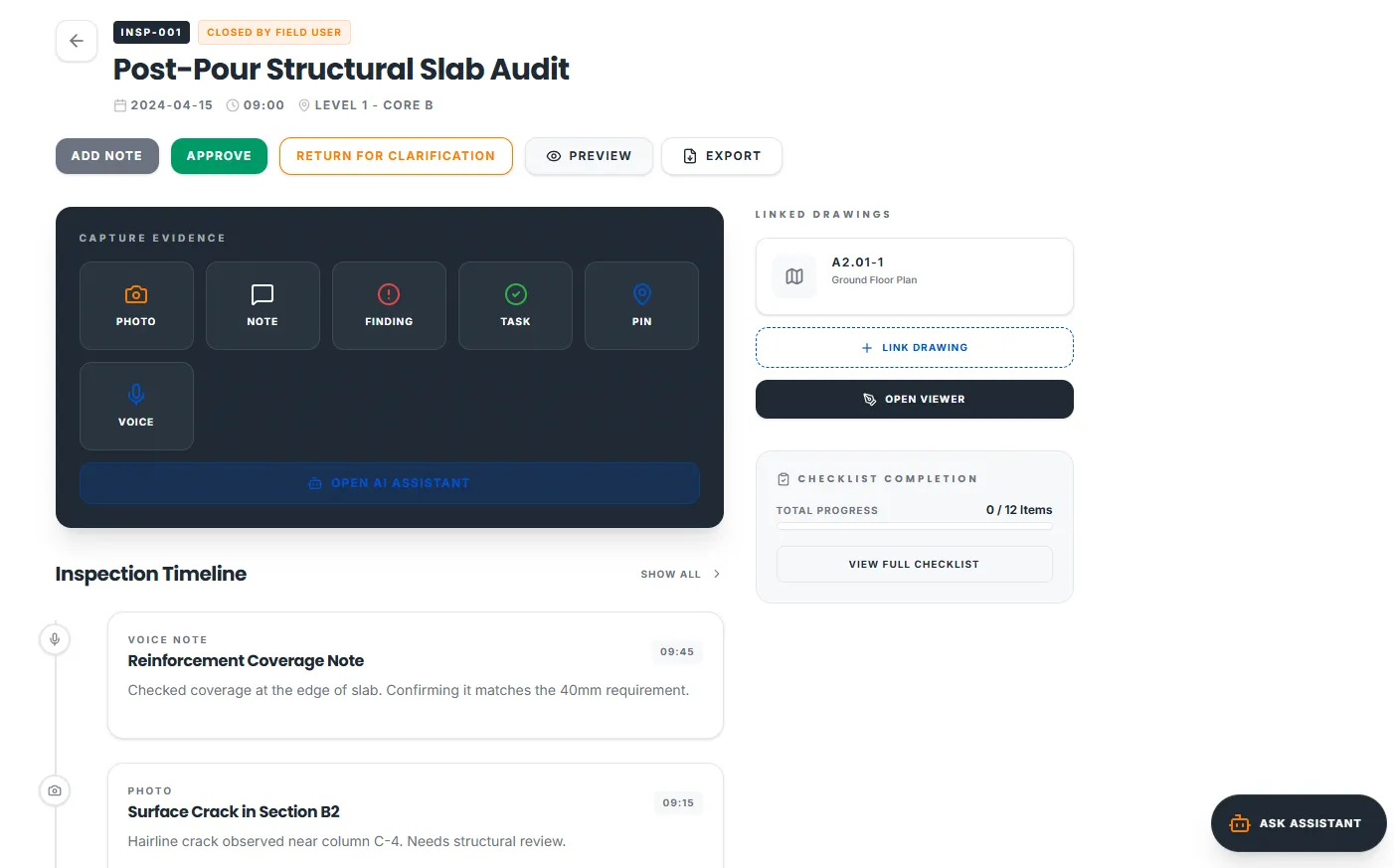
- Report done before you leave site
- Works offline, built for the field
- AI Assistant that reads your project records
- Markups pinned straight onto drawings
- One Master Project File, nothing scattered
Built by engineers who understand the demands of the Irish construction industry.
One tool for the people who build, inspect and sign off the work.
All you need, in one place.
Capture, drawings, AI, tasks, compliance and reports, all linked in one project record. No more five apps and a folder of loose photos.
Inspections
Structured inspections from first site visit to sign-off.
Site capture
Photos, typed notes and voice notes with auto-transcripts.
Drawing markups
Pin issues to the exact spot on the drawing.
AI assistant
Ask a question and get a source-backed answer.
Tasks & RFIs
Turn findings into tracked actions and RFIs.
Compliance
BCAR stage records and ancillary cert tracking.
Reports
Preliminary, daily and full reports from the record.
Master Project File
One chronological record per project, exportable in full.
Site records should not be scattered across phones, folders and inboxes.
Site inspections produce a lot of valuable information, but the record is often split between photos, handwritten notes, drawings, emails, PDFs and separate reports. SiteNotePro brings those records together so each inspection can be traced back to the project, drawing, location, task and report.
Photos scattered in phone galleries
Site photos are disconnected from the inspection, the drawing and the record.
Notes live in notebooks and emails
Handwritten notes, email threads and voice memos exist in separate places.
Drawings are separate from records
PDF drawings sit in folders, unlinked to the inspection entries that reference them.
Reports take too long to prepare
Pulling photos, notes and compliance items into a report is a manual process.
Compliance records are hard to trace
Linking a photo or note back to a specific item, drawing reference or inspection date is time-consuming.
Knowledge buried in old reports
Guidance, regulations and past reports sit in unstructured folders, searched manually.
One app. Every inspection. Every record.
Project drawings
Open the drawing, pin the issue to the exact spot. Photos, tasks and notes link straight to that point, not to a folder you have to go hunting through later.
AI that reads your project
Ask from inside a photo or drawing. Get source-backed answers from your own records and knowledge base. Draft report notes in seconds, then review and sign off.
Knowledge base
Track BCAR stages, ancillary certs, FSC, DAC, NZEB compliance, TGDs Parts A to M, planning conditions and many more side by side. Turn on what fits the job, hide what doesn’t.
Master Project File
Every inspection, markup, task and RFI in one chronological record per project. Linked, searchable, and exportable in full at any time.
One live project file, built day by day.
SiteNotePro keeps every inspection entry in one chronological project file. Photos, voice transcripts, drawing markups, findings, tasks and AI-assisted notes stay connected to the inspection that created them.
- Day-by-day inspection timeline
- Linked drawings, photos and tasks
- Open findings and follow-up actions
- Export-ready project record
- Professional review trail
Master Project File
SN-2026-089 · Ballybeg Residential
12 May 2026
L. O’Neill
L. O’Neill
Assistant
08 May 2026
L. O’Neill
T. Murphy
01 May 2026
L. O’Neill
Every inspection, drawing and record, connected.
Beneath it all, an assistant that never sleeps, helping your team find the right guidance, pull up project details and keep inspections moving. It reads your records and private knowledge base first, cites every source, and leaves the final call to you.
- Works from the drawing, photo, note or inspection you are looking at
- Searches your private uploaded files, not the open internet
- Cites every answer back to your record
- Drafts report notes and suggested checks for you to approve
SiteNotePro Assistant
Project-aware · Source-backed
Sources
Controlled records. Private knowledge. Clear responsibility.
SiteNotePro organises the information. It does not replace professional judgement or statutory certification.
Private by design
Your uploaded documents stay inside your SiteNotePro tenancy. Not shared with other customers, not used to train AI models.
Role-based access
Control who can view, add and export records on each project. No public sharing.
Review before issue
Reports and AI outputs are clearly marked and cannot be issued without a professional sign-off.
Full audit trail
Every entry, edit and export is logged with user, date and timestamp. Nothing is silent.
Currently selecting five Irish founding firms.
Work with the founder every month, shape what gets built, and keep your founding rate for life.
Apply for a founding spotPricing
Three plans and a founding partnership.
Tell us about your team and we’ll send the pricing that fits.
Solo
For one practitioner.
Pricing on request
Firm
For teams of up to 10.
Pricing on request
Enterprise
For teams of more than 10.
Quoted on the number of seats and your company’s needs
Founding Firm
For five Irish practices.
By application
Every plan includes a 30-day money-back guarantee, running from the day you get access.
Be one of the first construction teams on SiteNotePro.
Join the list and you are first in, with setup walked through with the founder. No pitch. Just yes or no.
We use your details only to manage early access. See our Privacy Policy.
Questions about SiteNotePro.
What does SiteNotePro do?
SiteNotePro is a site inspection and project records tool for construction teams in Ireland. It captures photos, voice notes, drawing markups, tasks, RFIs and compliance records into one chronological Master Project File, with an AI assistant that reads across all of it.
Who is it for?
Engineers, architects, building surveyors, inspectors, foremen and site managers working on construction projects in Ireland. One tool for the people who build, inspect and sign off the work.
How is SiteNotePro different?
Most teams keep their site records in five places: a camera roll, a notebook, an inbox, a folder of drawings and a report template. SiteNotePro keeps them in one chronological record per project, so every photo, note and markup stays tied to the inspection and the drawing it belongs to. The AI reads your own records and knowledge base, not the open internet, and cites every answer back to its source. It works offline on site, and it supports Irish practice, such as BCAR stage records, planning conditions and taking in charge, for the teams who need it.
What is SiteNotePro trying to achieve?
It was built as the tool the market was missing: one place to keep site inspections, drawings and project records connected, instead of scattered across phones, notebooks and inboxes. We’re building it with modern technology to make everyday project admin faster, clearer and more reliable, so the record is complete before you leave site and ready when a report, an audit or a dispute needs it.
Who is behind SiteNotePro?
SiteNotePro was founded by a chartered civil engineer with years of experience across Ireland’s construction and engineering consultancy sectors, and a co-founder with a background in finance and business. It is led by a small team who understand the pressure, pace and detail involved in managing project records properly, and we welcome feedback from anyone using it on active projects.
Is SiteNotePro an Irish business?
Yes. SiteNotePro is built and run from Ireland by its founders, for construction teams working in Ireland. We are in the process of incorporating SiteNotePro as a company; once that is complete, our registered company details will be published in our Terms of Use and Privacy Policy.
Can I use SiteNotePro now?
Not yet. SiteNotePro is still being built. Join the early access list and you are first in when it opens, with setup walked through with the founder. Five Irish practices can also apply to be Founding Firms and help shape what gets built.
How much does SiteNotePro cost?
We are not publishing list prices while we onboard the founding group. Solo is a single-user plan and Firm covers teams of up to 10. For teams of more than 10, Enterprise is quoted on the number of seats and your company’s needs. Tell us a little about your team and we will come straight back with the rate.
Does SiteNotePro certify compliance?
No. SiteNotePro helps organise inspection information and supports compliance record keeping. It does not certify compliance, replace professional judgement, or carry professional responsibility for any inspection, report or decision. The professional user remains responsible for review, sign-off and issue.
Does the AI replace the engineer?
No. AI outputs are suggestions, clearly marked, and require professional review before they go into a report or a compliance record. The engineer stays responsible.
Where is my data stored?
Your project records, files, photos and voice notes all stay on EU servers, including the transcription that turns voice notes into text. Account emails we send you stay in the EU too. The only thing that leaves the EU is email between you and us, including anything you send through a form on this site, which reaches our mailbox through a US provider under a data processing agreement. Your data is never used to train AI models. We can share the full data-flow map and sub-processor list on request.
What happens to my data if I cancel?
Export any inspection record as a PDF before you go, and ask us if you want the whole project record put together. After you cancel we hold your data for a grace period and then delete it permanently, or sooner if you ask. The periods, and the separate rule for deleting one record inside a live account, are set out in our Terms of Use.